3M Blackmarket
 by NastyStoner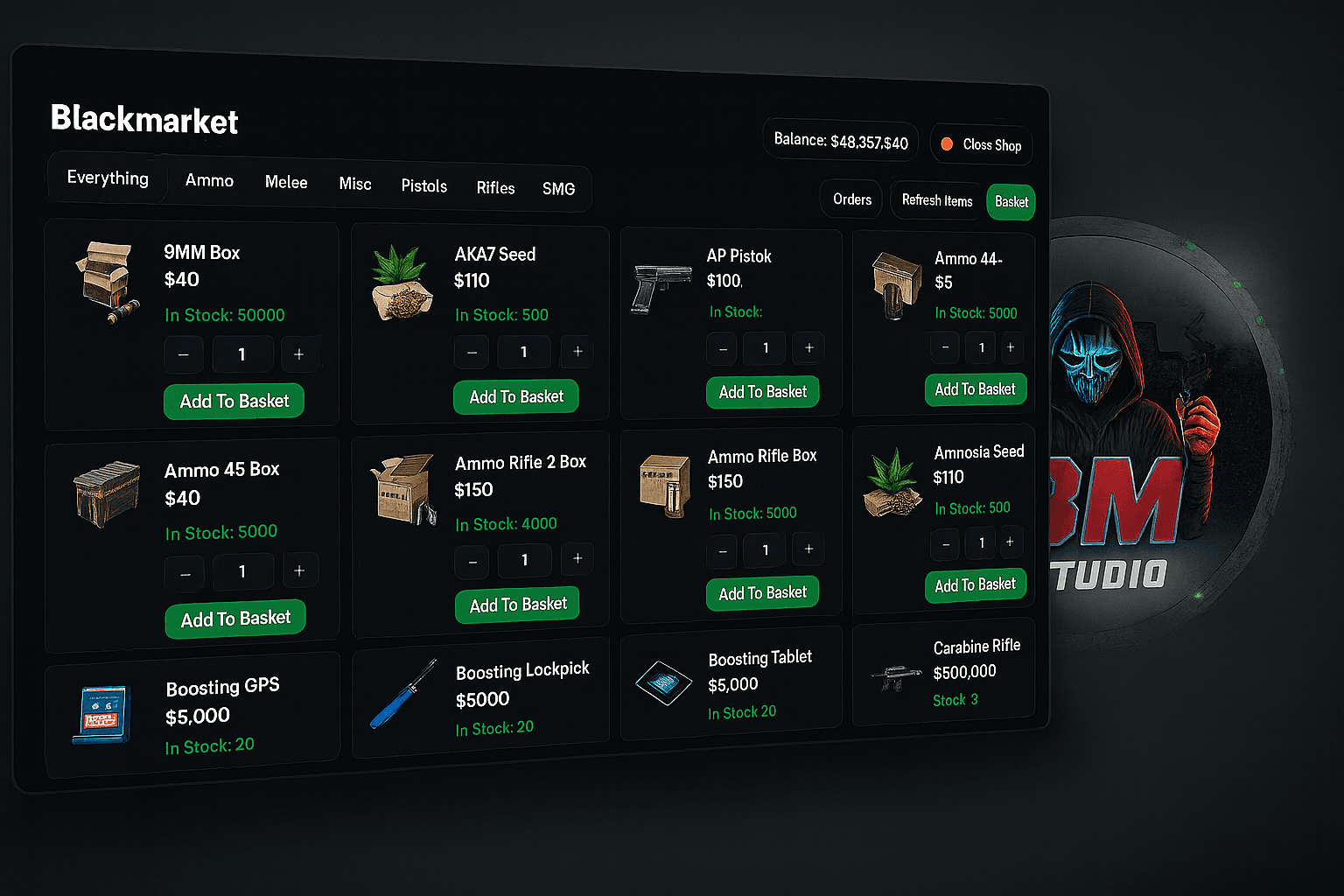
Bring a fully-featured, configurable blackmarket into your city: order weapons and contraband, pay with black money, pick up crates at random dead drops and race the timer before your stash expires. Supports ESX & QBCore, ox_inventory & qb-inventory, ox_target & qb-target – plus optional lb-tablet integration.
Everything is handled server-side, with persistent stock, order history and smart stash cleanup so players can’t easily abuse or dupe.
🧩 Core Features 🕵️♂️ Immersive Blackmarket NPC Configurable NPC (model, coords, scenario) acting as your blackmarket dealer.
Custom made parcel box for better immersion.
Target integration (ox_target / qb-target) – walk up, interact, and open the store.
Optional standalone command (e.g. /blackmarket) for quick access without NPC.
💻 Clean NUI Storefront Modern, category-based weapon shop NUI:
Pistols, SMG, Rifles, Ammo, Melee, Misc
Item name, image, price, current stock and category
Cart system:
Add/remove multiple items before checkout
Total updates live
Displays the player’s black money balance in real time.
Fully localized client labels (categories, prompts, blip names, etc.).
📦 Dead Drop Delivery System Turn every purchase into a mini-event:
After checkout, the system:
Charges black money (configurable per framework).
Picks a drop location from Config.DropPoints.
Creates a stash at the drop with all purchased items.
Generates a unique 6-digit PIN code.
Player receives:
Notification with the PIN.
GPS waypoint to the drop (optional blip).
Order added to their recent orders list.
At the drop:
Target interaction at the configured points (Bridge.Target.AddDropPoint).
PIN entry via ox_lib.
Server validates:
Correct code.
Not expired.
Belongs to this player.
On success, the player opens the stash and loots the package.
⏲️ Smart Expiry & Anti-Abuse Two layers of cleanup to keep the system safe and clean:
Pre-open expiry If the player never even opens the stash before Config.Delivery.ExpiryMinutes, the stash is deleted and the order is considered expired. Player gets a localized “order expired” notification.
Post-open expiry & stash watcher After opening:
Optional extra time window before forced cleanup.
For inventories that support it (ox_inventory), a background watcher checks if the stash becomes empty and removes it automatically.
All cleanup goes through the inventory bridge (no direct ox-only calls), so it works cleanly on both ox_inventory and qb-inventory.
🧮 Persistent Stock & Dynamic Restock Per-item stock and maxStock are configured in Config.Items.
Actual stock is persisted to JSON (blackmarket_stock.json) and synced to SQL (bm_items).
On resource restart or manual sync, config items are:
Synced to the database.
Missing config items are deactivated (stock set to 0).
Auto restock modes (Config.AutoRestock.Mode):
restart – restock on script restart.
daily – restock every 24h.
weekly – restock every 7 days.
monthly – restock every 30 days.
none – no automatic restock.
Every restock sets all items to their maxStock, pushes updated stock to all connected clients and persists the result.
🧾 Order History in NUI The script tracks orders in SQL (bm_orders + bm_order_items).
Players see last 7 days of orders in the NUI:
Order total, status, list of items, quantities and prices.
Associated drop location and PIN code.
They can click an order to set GPS to that drop again (configurable).
🌍 ESX & QBCore Framework Bridge Framework auto-detection (Config.Framework = 'auto'), or manual:
esx – uses black_money account by default.
qbcore – uses cash or any account name you configure.
Helper functions:
Get identifier.
Get/add/remove black money.
Admin check for commands.
All money checks & removals happen server-side before any items are created.
📦 Inventory & Target Bridges Works with your favorite stack:
Inventory bridge
ox_inventory
qb-inventory
Common “stash” interface for both (register, add items, open, clear, remove).
Optional CanWatchStash() for live empty-stash detection.
Target bridge
ox_target
qb-target
Unified helpers:
AddNpcTarget for the NPC.
AddDropPoint for crate pickup locations.
You pick providers in the config (Config.Inventory, Config.Target), or leave them on auto to detect what you have.
📱 Optional lb-tablet App Integration If you use lb-tablet, you can run the blackmarket as a tablet app instead of a standalone NUI:
Config toggle: Config.LBTablet = true.
The script registers a custom app with:
Name, description, developer.
App screenshots.
App lifecycle:
onOpen – loads items, orders, balance and sets status online.
onClose – closes the app cleanly.
If Config.LBTablet = false or lb-tablet isn’t running, all lb-tablet logic is safely skipped (no exports are called).